

When you hear “flagship,” you might think of phones or cars. But what about your desk?
We’re not just talking about a powerful computer. We’re talking about a personal sanctuary. It’s a modern-day man cave where logic meets luxury. This is the ultimate command center.
Why would anyone spend five grand on a setup? It’s where the law of diminishing returns gets a standing ovation. You’re paying for the point where raw performance shakes hands with pure prestige.
Every dollar past the “it just works” threshold is an investment in an experience. It’s functional art that makes a statement before you even press the power button. This isn’t a purchase. It’s a curation.
So, we’re conducting a financial autopsy of a dream. The question shifts from “can it run the latest game?” to “does it deserve the premium real estate on your desk?”
Aesthetic Concepts and Material Choices
Most people view a PC case as just a box for parts. We see it as a gallery, the first chapter of your tech story. It’s where we explore the philosophy of materials.
What story does your case tell? Is it the sleek feel of aluminum, hinting at CaseLabs’ perfection? Or the bold look of glass? Maybe it’s the strong, quiet vibe of steel, like the O11D. Each material choice speaks volumes.
Inside this gallery, every part is a carefully chosen piece. Theme cohesion is key here. A steampunk build isn’t just about brass; it’s about copper pipes and wood against black.
A cyberpunk rig is all about neon and dark contrasts, with vinyl decals that look like graffiti. Minimalism is the ultimate statement, where every cable is a deliberate choice.
Think of your PC as a collection of high-end items. That astronaut figure isn’t just plastic; it’s a memory. The Murakami pillow adds joy. Your PC is the same.
A forged carbon fiber GPU shroud isn’t just for cooling; it’s about speed and cost. A custom cerakoted radiator isn’t just a heatsink; it’s a unique piece.
This is where your battle station becomes more than an appliance. It becomes an artifact. The aesthetic concepts you choose, like custom finishes and themes, turn silicon and solder into a signature. It’s the difference between owning a tool and creating a legend.
4K 240Hz and GPU Pairings
Buying a halo GPU for 4K 240Hz is like getting a Formula 1 car for your daily drive. It’s exciting but not very useful. It’s all about spending wisely, not just money.
What do you get from an RTX 4090 or its next version? In many games, it’s a pricey lesson in not getting much more. For esports fans, getting 400 frames in Valorant at 1080p is key. But at 4K, you hit a wall where extra frames don’t matter much.
The best use for a halo GPU is in single-player games. Think Cyberpunk 2077 with amazing graphics or a detailed Elden Ring. Here, it’s about smooth, flawless visuals, not just fast frames.
Choosing the right monitor is key. You need something fast like Fast IPS or deep like OLED. Both must support VRR for smooth visuals.
But, a CPU bottleneck can stop your 4K 240Hz dreams. If your CPU can’t keep up, your expensive GPU waits. This is like pairing a $1,600 GPU with a cheap CPU.
Is spending this much worth it? For the top 1% who want the best, yes. But for most, it’s overkill. A list of top graphics cards shows better, more affordable options.
Going for 4K 240Hz with a halo GPU is like racing in space. It’s exciting, pricey, and pushes limits. But often, you’re racing against yourself.
Custom Loop Planning: Pumps, Rads, Distro, Fittings
Planning a custom water loop is more than just building a PC. It’s creating a masterpiece. Every choice you make affects the noise, temperature, and performance of your system.
It’s not just about following steps. It’s about understanding the reasons behind each choice. This is what makes a good loop great.
The Pump Dilemma: D5 vs. DDC
Your pump is more than just a heart. It’s the soul of your loop. The D5 and DDC pumps are often compared.
Choosing a pump is not just about flow rates. It’s about noise and system reliability. The D5 is quiet and efficient, needing less space.
The DDC is compact and powerful. It’s great for complex loops but can be noisy. It also needs cooling.
Your pump choice sets the tone for your system’s performance.
| Feature | D5 Pump | DDC Pump |
|---|---|---|
| Core Design | Large, low-RPM impeller | Small, high-RPM impeller |
| Noise Profile | Subdued, low-frequency hum | Higher-pitched whine (requires good cooling) |
| Best For | High-flow, low-restriction loops; priority on silence | High-pressure, restrictive loops; compact spaces |
| Redundancy Note | Often used in dual-pump setups for failsafe operation | Single unit often sufficient for pressure; heat output is the concern |
Radiator Philosophy: Buying Silence
Why choose a huge 480mm radiator? Or even two? It’s not just about cooling. It’s about quieting your system.
A bigger radiator means your fans work less. They can spin slower, making less noise. This is the ultimate luxury in a custom loop.
It’s like the difference between a loud sports car and a quiet luxury sedan. Both are fast, but one is peaceful.
The Distro Plate & The Fitting Finale
The distro plate is the heart of your build. It’s not just a reservoir. It’s the system’s brain and main beauty.
A good distro plate turns tubing into art. A bad one looks like a mess. Its design is key.
Then, there are the fittings. You can choose brass, nickel, or acrylic. Brass is durable and classic. Nickel is sleek and resistant to corrosion. Acrylic is for those who want to see everything, but it’s delicate.
Each choice adds complexity and maintenance costs. More fittings mean more leaks. Clear coolant shows everything, for better or worse.
This is where your custom loop becomes a work of art. It can be functional or beautiful. The difference is in the planning, not the money.
Advanced Cable Crafting and Sleeves
Let’s face it: a powerful rig looks bad with messy cables. We’ve moved past simple cable management. This is about sculpting cables. If the custom loop is your PC’s heart, these wires are its brain.
Inside the case, we ditch stiff power supply cables. We use custom-sleeved cables in materials like paracord or teleios. These cables are flexible and route cleanly through the chassis. Aluminum or acrylic combs then align each wire with military precision.
But the mission doesn’t stop at the case’s edge. The real frontier is your desk. Every high-end peripheral—like your mechanical keyboard or studio DAC—brings another wire. We aim for a clean, intentional landscape, not a mess.
How do you achieve desk-side serenity? A multi-pronged attack works best:
- Under-Desk Cable Trays: These metal channels are unsung heroes. They hide power strips, excess cable length, and USB hubs, creating a clean desk illusion.
- Wireless Charging Pucks: Strategically placed, they eliminate phone and headset charging cables. It’s a small win with a big visual impact.
- Disguised USB Hubs: Why use a plastic brick when you can use a hub in a desk plant pot or a minimalist aluminum block? Treat functionality as desk art.
The philosophy is simple: every connection must have purpose and presence. A braided keyboard cable routed through a desk grommet isn’t just tidy; it’s a statement. The power cable for your studio monitors, secured with subtle adhesive clips along the monitor arm, shows forethought.
This meticulous approach to wiring is what separates a collection of expensive parts from a cohesive, high-end peripherals ecosystem. It’s the final, critical layer that tells the world you sweat the details. Because in the end, chaos is free, but order—this beautiful order—is priceless.
Audiophile Corner: DAC/Amps, Planars, Speaker Placement
If you think high-fidelity audio is just a tinny sound from a gaming headset, you need a wake-up call. Using your motherboard’s audio is like listening to music through a cardboard tube. It’s not the real deal.
Enter the world of audiophile DAC/amp stacks. A Digital-to-Analog Converter (DAC) and a dedicated amplifier do more than just make music louder. They bring out hidden details and present them with clarity and space.
The Cen.Grand DSDAC1.0 Deluxe is a top-tier option, priced at around $6,219. Its designer, JianHui Deng, sees digital music as a continuous, analog-like wave. This DAC uses special DSD conversion and “synchronous direct clock technology” to achieve its sound.
Reviewers say this DAC offers extremely smooth, organic, fluid, and effortless sound. It’s natural but never cold. The soundstage is wide and lifelike, making instruments feel real in the room.
Planar magnetic headphones are a key partner for a great DAC. They use a flat diaphragm for fast response and low distortion. This means you can hear every detail, from a cymbal crash to a singer’s breath.
Speaker placement is also critical in a near-field desk setup. Even the best speakers can sound bad if placed wrong. The goal is to create an equilateral triangle between your head and the speakers.
- Height: Tweeters should be at ear level.
- Distance: Start with speakers and your head each forming a point of a triangle with equal sides.
- Toe-in: Angle speakers slightly inward, pointing just behind your head.
- Isolation: Use foam pads or stands to decouple speakers from the desk, killing resonant vibrations.
A dedicated amplifier gives you the power to drive your headphones or speakers well. It unlocks dynamics and headroom, making your music come alive. It turns data into atmosphere.
Building a top PC but using bad audio is a big mismatch. It’s like creating a masterpiece and then viewing it in a dim closet. Invest in your ears. The reward is in the music itself and the silence between the notes.
Smart Power and UPS Sizing
If your PC build is like a Formula 1 car, then your power supply and backup are key. They are like the pit crew and safety systems. Ignore them, and you risk a lot. The power grid is like a pea in a bed of feathers.
First, the power supply (PSU). You don’t just size it for your parts’ base power needs. You size it for when your CPU and GPU are overclocked. Add 50% headroom to be safe.
- It keeps the PSU in its peak efficiency range, running cooler and quieter.
- It provides clean power for stable overclocks.
- It future-proofs for even hungrier next-gen components.
A 1000W system load needs a 1200W or even 1500W PSU. Silence is a luxury you’ve already paid for.
Now, the UPS (Uninterruptible Power Supply). This isn’t just an accessory. It’s mandatory insurance. A sudden blackout shouldn’t turn your flagship into a very expensive paperweight.
You need a pure sine wave output. Simulated sine wave can damage modern, active PFC power supplies. Don’t risk it. Size it not to game through a hurricane, but to save your work and initiate a graceful shutdown.
Calculate your system’s volt-amp (VA) requirement, which is roughly its wattage. A 1000W setup needs at least a 1500VA UPS to handle the initial power draw and give you several minutes of runtime. For a robust, all-in-one solution, consider a high-capacity pure sine wave battery backup like the Genbox 2400. Think of it as the digital dam between your masterpiece and the chaotic grid.
High-End Ergonomics: Sit-Stand, Arms, Reclaimed Wood
Ergonomics is more than just about posture. It’s about how your body interacts with your workspace. A cheap desk can lead to back pain and distraction. A good desk is essential.
A premium desk is made of solid materials. It’s not shaky like cheaper desks. Desks made from solid hardwood or reclaimed wood are stable and have character.
The best desks move with you. They have motors that adjust to standing height. This improves your health and focus.
What sits on your desk is also important. A good monitor arm keeps your space clean. It lets you arrange your screens perfectly.
Your chair is key to comfort. A good chair supports you well and stays comfy all day. A two-thousand-dollar chair needs a fifty-dollar desk.
This setup makes your workspace better. It combines tech with comfort. Your body is part of the system, not an afterthought.
Photography-Ready Cable/Light Tricks
In today’s digital world, a top-notch PC build is only real when it’s photographed. You’ve worked hard on its performance and looks. Now, it’s time to capture it perfectly. This isn’t about adding flashy lights. It’s about lighting choreography.
Forget the “unicorn vomit” look. Aim for a soft, ambient glow. Use low-lumen LED strips to create a halo effect. This makes your components look like they’re floating.
For special parts like the CPU water block, use cool-white spotlights. They guide the viewer’s eye like a museum curator’s lamp.
Diffusers are key. They soften harsh LED light. A frosted acrylic strip or milky tubing spreads the light evenly. This makes your build look expensive and intentional in photos.
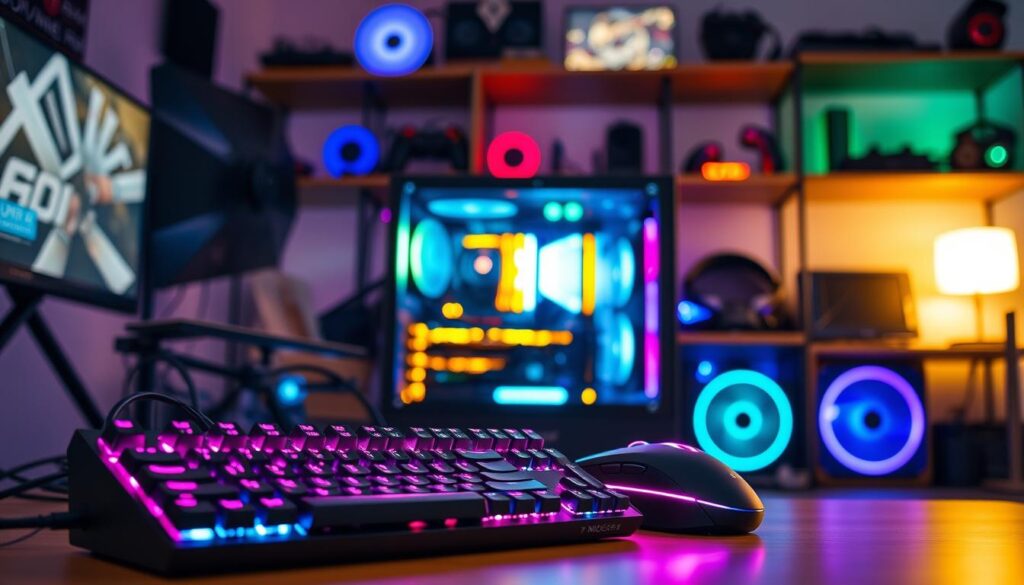
Reflections from glass panels can be a problem. They show unwanted things like your phone or ceiling fan. To avoid this, shoot in a dark room with only your PC lights on. For daytime shots, use a large matte black poster board to block reflections. It’s cheap and effective.
Cables must be neat in photos. A single wire looks like a mistake. Use the photo session to tidy up your cables. The camera catches every detail you might overlook.
Good gear is important, but not as much as you think. A smartphone can take amazing photos. But if you have a DSLR or mirrorless, use a prime lens. A 50mm f/1.8 lens creates a beautiful, blurred background. This makes your PC stand out.
Take your photos like portraits. Give your build space in the frame. Shoot from different angles to show off your work.
Let’s be honest. If your build isn’t photographed and shared online, did it even happen? This is the final step. Your build isn’t complete until it’s shown off.
Three Elite Example Builds with Part Lists
Enough with the concepts; here are three tangible monuments to PC building ambition, each with its own manifesto. Theory is comforting, but hardware is truth. Let’s examine what happens when unlimited budget meets specific philosophical constraints.
We’ll explore three distinct paths: the brute-force colossus, the engineering haiku, and the narrative sculpture. Each represents a different answer to the same question: what does “flagship” actually mean to you?
This build operates on a simple principle: if you can fit it, you must include it. It’s the PC equivalent of a megayacht—ostentatious, technically impressive, and completely unnecessary for 99% of tasks. The case isn’t a component; it’s a real estate holding.
We’re talking about chassis like the Phanteks Enthoo Elite or the Corsair Obsidian Series 1000D. These are less cases and more small apartments with excellent airflow. The goal here is zero compromise on thermal performance and expansion. It’s for the user who looks at a standard ATX tower and thinks, “Cute.”
The rationale is pure performance absolutism. Why choose between multiple radiators when you can have all of them? Why worry about drive bays when you can have twenty? This build celebrates excess as a virtue.
| Component Type | Specific Model | Price (Estimate) | Rationale & Notes |
|---|---|---|---|
| Case | Phanteks Enthoo Elite | $900 | The foundation. Supports dual systems, massive radiator space. It’s a statement before you even power on. |
| CPU | AMD Ryzen 9 7950X3D | $700 | Gaming and productivity king. The Monolith doesn’t do “either/or.” |
| GPU | NVIDIA GeForce RTX 4090 (x2 in NVLink) | $3,200 | Because one isn’t the limit. For specialized professional workloads, this is the hammer. |
| Cooling | Custom Loop: 3x 480mm Radiators, Dual D5 Pumps | $1,500+ | Overkill is the point. Sub-ambient cooling? Maybe. Silence under full load? Guaranteed. |
| Power | Seasonic Prime TX-1600 | $500 | 1600W of headroom. It’s not about need; it’s about never seeing the power meter twitch. |
The Minimalist Statement: Constraints as a Creative Force
If The Monolith is a symphony, this is a sonnet. Building in a case like the FormD T1 or the Louqe Ghost S1 is an exercise in precision engineering. Every cubic millimeter is contested territory. This philosophy argues that true luxury isn’t about having everything, but about having the exact right thing.
The challenge is fascinating. You must find components that deliver flagship performance while conforming to brutal spatial limits. It celebrates clever engineering—the low-profile RAM, the deshrouded GPU with slim fans, the expertly routed custom cables.
This build is for the urbanite with limited desk space, or the perfectionist who finds beauty in efficiency. It’s the battle station as a bespoke suit, not a king’s robe.
| Component Type | Specific Model | Price (Estimate) | Rationale & Notes |
|---|---|---|---|
| Case | FormD T1 V2.1 (Sandwich) | $250 | The canvas. Under 10 liters. Build quality is impeccable—machined aluminum, no plastic. |
| CPU | Intel Core i9-14900K | $600 | Raw power, tamed by a top-tier AIO. The thermal challenge is part of the fun. |
| GPU | NVIDIA GeForce RTX 4090 (Founders Edition) | $1,600 | The FE cooler is the only 4090 that reliably fits. Performance, minus the bulk. |
| Cooling | Phanteks Glacier One 240MP + Noctua Fans | $200 | AIO supremacy in SFF. The 240mm radiator is the largest the case can handle. |
| Power | Corsair SF1000L | $250 | 1000W in an SFX-L format. Silent under even the heaviest combined load. |
The Thematic Art Piece: The Battle Station as Narrative
This build asks a different question: what story does your PC tell? Here, performance benchmarks share the stage with aesthetic cohesion. Think “Cyberpunk 2077” with neon acrylics and custom-etched brass, or “Steampunk” with weathered leather, gauges, and copper tubing instead of traditional water cooling.
The part list is just the starting point. The real cost and effort go into custom fabrication, paint matching, and modified parts. A GPU shroud is remade. Cable sleeves are dyed to a specific Pantone color. It’s less about assembling a computer and more about directing a play where every component is an actor.
This philosophy elevates the build from a tool to an heirloom. It’s for the builder who sees their desk as a gallery wall.
| Component Type | Specific Model / Approach | Price (Estimate) | Rationale & Notes |
|---|---|---|---|
| Theme | “Neo-Tokyo Rain” (Cyberpunk) | N/A | The core concept. Drives every material, color, and lighting decision. |
| Case | Lian Li O11 Dynamic Evo (Heavily Modified) | $400 + $1k mods | Baseline case. Mods include custom aluminum facade, etched glass, integrated neon. |
| Cooling | Hardline Loop with Colored Coolant & Custom Fittings | $1,200+ | Coolant is “Synthwave Purple.” Fittings are anodized gold. Form equals function. |
| Key Aesthetic | Fully Custom Cables (MDPC-X Sleeving) | $500 | Cables are part of the visual flow, color-matched to the theme’s palette. |
| Lighting | Programmable ARGB (Controller via SignalRGB) | $300 | Lighting scenes are curated like a soundtrack, synced to media or time of day. |
Three builds, three definitions of “elite.” The Monolith worships at the altar of pure capability. The Minimalist Statement finds grace in limits. The Thematic Art Piece argues that context is king. Your choice of flagship build reveals your personal tech theology. Now, which scripture speaks to you?
Thermal/Noise Benchmarks
Let’s look at the real data that shows if a PC is good or not. Your thermal and noise benchmarks are key. They show if your PC is top-notch or just a fancy heater.
What makes a PC “good”? It’s not just a low temperature reading. It’s about the delta—the difference between your coolant and room temperature. This delta is important, like during long gaming sessions.
For a custom water-cooling loop, CPU and GPU temperatures should be 15-25°C above the coolant. If your coolant is at 35°C, a CPU at 55-60°C is great. This is cooler than air coolers, which can reach 75-85°C.
But cooling is only half the story. Noise is also key. A 35 dB(A) noise level under load is ideal. This is quieter than a library.
Managing pump noise and fan curves is tricky. If your fans spin too fast, it’s loud. If they’re too slow, your PC gets too hot.
Coil whine from your GPU is another challenge. It’s a high-pitched squeal that water can’t fix. Some GPUs are worse than others.
This table shows how different cooling methods compare under the same load.
| Cooling Solution | CPU Temp (°C) | GPU Temp (°C) | Noise Level (dB(A)) | Notes |
|---|---|---|---|---|
| Premium Air Cooler (Dual Tower) | 78 | 72 (Founders Edition) | 42 | Simple, reliable, but can get loud under load. |
| AIO Liquid Cooler (360mm) | 65 | 68 (Founders Edition) | 38 | Better CPU temps, pump adds to noise profile. |
| Custom Loop (Dual 360mm Rads) | 58 | 52 (Full-Coverage Block) | 34 | Best temps and noise, requires most expertise and cost. |
| Custom Loop (Quiet Fan Profile) | 64 | 58 | 31 | Sacrifices a few degrees for near-silent operation. |
The data shows your choices were worth it. Sleek tubes and big radiators make your PC cooler and quieter.
Chasing these benchmarks is rewarding. It proves your PC is more than just a pretty face. When it’s cool and quiet, you know it was worth the money.
Maintenance Routines
Having a top-notch PC is like having a high-maintenance pet. It needs regular care. The maintenance is like a prenup, weekly therapy, and anniversary gifts all in one.
This isn’t a “set it and forget it” deal. True ownership means actively keeping your PC in top shape. If you ignore it, performance will slowly decline.
For those who love custom loops, the annual calendar is key. The main event is the coolant flush. It’s like a kidney dialysis for your PC. Old coolant must be replaced to keep things running smoothly.
During the flush, you do a detailed inspection. Look for any signs of trouble, like cloudiness or microfissures. These small cracks can cause big problems.
Then, every few years, you do a complete tear-down. Everything comes out for a deep clean. It’s like an archaeological dig.
Air-cooled PCs have their own set of rules. Compressed air is used monthly to clean out dust. Dusty radiators and fans can slow things down.
Another important task is thermal paste reapplication. Every two years, you replace the old paste with new. This helps keep your PC cool.
Dust is a constant enemy. It gets everywhere, despite your best efforts. Accepting this is the first step to maintenance peace.
Every six months, you should re-cable your PC. It’s a chance to tidy up and show control over your case. It’s not necessary, but it’s important.
The cost of owning a PC is just the beginning. The real work is in the cleaning, inspection, and flush. These tasks turn you from a buyer into an owner. Your PC’s health depends on these rituals. Now, check those filters.
Future-Proofing for Next GPU/CPU Gens
‘Future-proofing’ is more myth than reality, but smart planning is your real power. The tech world often tells you to spend now for a future that never comes. But, wise people look at the bigger picture.
Your main goal isn’t to keep your computer forever. It’s to get the most value and avoid hassle when you need to upgrade. This means choosing upgrades that make sense.
Start with your base—the platform. You’re likely deciding between AMD’s AM5 and Intel’s LGA1851. Both claim to support future processors, but there’s a catch. AM5 seems to offer a clearer upgrade path without needing a new motherboard. LGA1851 is new, but Intel’s history with sockets is mixed.
So, what’s best for you? If you want an easy CPU swap in a couple of years, AM5 is safer. If you’re building a top-notch system now and plan to keep it for years, the platform choice is less important. Here’s a quick guide to help you decide.
| Platform | Promised Longevity | Upgrade Path Realism | Sage’s Verdict |
|---|---|---|---|
| AM5 | Support through 2025+ | High. Likely drop-in CPU upgrades for 2-3 generations. | Best for incrementalists who hate buying motherboards. |
| LGA1851 | Typically 2 generations | Moderate. May support next-gen CPUs, but beyond is a gamble. | For those who build max-spec now and rebuild fully later. |
Next-gen GPUs are another story. That 1200W power supply you bought? Its power is less important than its connectors. Does it have the right 12VHPWR or updated 12V-2×6 cable for Nvidia’s latest and future GPUs? An adapter is a messy, stressful fix.
Physical space is also key. We’re moving towards 4-slot GPU coolers as standard. Is your case big enough? Does your custom loop have enough space to cool a future 500W+ GPU? These are the real questions, not the ones marketing brochures focus on.

I believe one thing is truly future-proof: a great case. Not just any case, but a high-quality one with room to grow. A case like this lasts longer than any part inside it. It’s the base you keep coming back to.
Can you plan for the next 2-3 years? Absolutely. That’s smart planning. But trying to plan for a decade? That’s a waste of time. Progress keeps moving forward.
The truth the marketers won’t share is that the fun of PC building is the chance to start over. Planned obsolescence is actually a good thing for us. Enjoy the cycle, invest in a solid base, and accept the ongoing upgrade journey.
Conclusion
So, what’s the point of all this? We’ve looked into the details of excess, from 4K 240Hz monitors to silent custom loops.
A top-notch battle station is more than just a computer. It’s a personal project that blends engineering and art. It needs a bit of madness.
The true value isn’t in a benchmark score. It’s in the quiet click of a Noctua fan switch. It’s the silent hum of a Corsair ML Elite tuned just right.
I’ve found joy in the journey, not just the end result. The research, the cable work, and planning a water-cooling run with EKWB fittings.