

Alienware’s 34-inch AW3426DW is the kind of monitor that makes a gaming upgrade feel bigger than a graphics-card swap. Dell’s latest ultrawide QD-OLED display brings a 3440×1440 curved panel, 21:9 aspect ratio, 280Hz refresh rate, OLED response behavior, and a launch price around $799.99 into a category that used to feel much harder to justify for mainstream high-end PC gamers. Dell’s official AW3426DW page lists the model as the Alienware 34 280Hz QD-OLED Gaming Monitor, while recent reviews from PC Gamer, Tom’s Hardware, PCWorld, TechRadar, and Windows Central have framed it as one of the most important 34-inch OLED monitor releases of 2026.
That matters for Cooler Master Gaming readers because ultrawide OLED changes the whole setup equation. A 34-inch 21:9 monitor does not only ask whether the GPU is fast enough. It asks whether the desk, case airflow, cable layout, viewing distance, game library, productivity needs, and upgrade budget all make sense together. That same setup-first logic shaped Cooler Master Gaming’s recent Alienware AW2726DM budget OLED analysis, where the key question was whether a cheaper QD-OLED display could make a midrange PC feel more premium before the next GPU upgrade.
Why The AW3426DW Makes Ultrawide Feel Less Niche
Ultrawide gaming monitors have always had a strong appeal: wider field of view, more immersive single-player games, better timeline space for creators, and a desktop that can replace a dual-monitor setup for many users. The problem has been costly and compromising. Older ultrawide OLEDs were expensive, some had text-fringing concerns, and high-refresh 3440×1440 gaming still required a capable graphics card.
The AW3426DW does not remove every compromise, but it makes the category more serious. PC Gamer’s review says Alienware upgraded the 34-inch line with Samsung’s latest QD-OLED panel technology known as Penta Tandem, raising the refresh rate from earlier 175Hz and 240Hz versions to 280Hz. The review also notes that Alienware’s 34-inch OLED line now looks more aggressive on value than it did when the original AW3423DW helped define the category.
The value point is important. PCWorld lists the AW3426DW at a $799.99 MSRP with a five-layer QD-OLED panel and a 280 Hz refresh rate. That is still a premium price, but it is no longer the kind of price that makes ultrawide OLED feel like a luxury experiment for only the most extreme setups.
For gamers who already planned to spend heavily on a graphics card, the AW3426DW creates a different upgrade path. Instead of chasing a small GPU tier jump, some players may get a more obvious everyday improvement from a display that changes how games look, how motion feels, and how the desktop is used outside games.
What Penta Tandem QD-OLED Changes
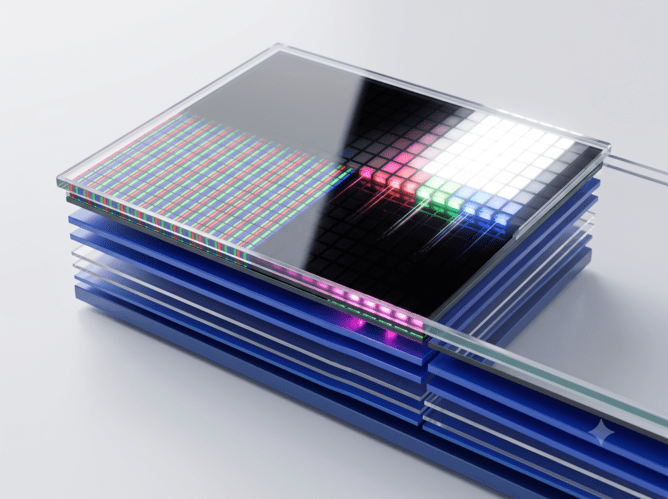
The most important technical change is the panel. The Verge reported during Computex 2026 that the AW3426DW uses Samsung Display’s QD-OLED Penta Tandem technology, a new five-layer OLED architecture designed for the latest generation of premium displays. The same report listed the monitor as a 34-inch curved 3440×1440 display with an 1800R curve.
Tom’s Hardware described the panel upgrade as a five-layer tandem OLED design that improves light output, adds a V-stripe RGB subpixel structure for sharper rendering, moves refresh from 240Hz to 280Hz, and uses a new anti-reflective coating. Those details matter because OLED gaming monitors are no longer being judged only by perfect black levels and pixel response. Buyers now care about text clarity, brightness, desktop usability, HDR behavior, and whether the display works well as a full-time monitor.
That text-clarity improvement may be one of the biggest practical upgrades. Earlier OLED panels could look outstanding in games, yet they were less comfortable for small text, web browsing, editing, spreadsheets, and long desktop sessions. Windows Central’s review says the AW3426DW’s Penta Tandem panel improves brightness, color, and text readability compared with its predecessor.
The AW3426DW is not simply “another OLED.” It is part of a panel-generation shift where OLED monitors are trying to become better daily displays, not only better game screens.
Why 3440×1440 Is A Smart Gaming Target In 2026
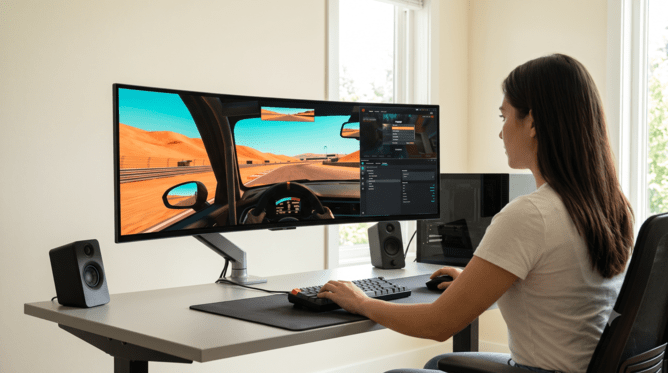
A 34-inch ultrawide at 3440×1440 sits in a useful middle zone. It is more demanding than standard 2560×1440, but it is still easier to drive than 4K. That makes it attractive in a year when GPU pricing, memory costs, and premium upgrade timing remain messy for PC builders.
A player moving from 1080p to 3440×1440 will feel a major visual jump. A player moving from a 27-inch 1440p monitor gets a wider field of view and more desktop space without taking on the full GPU load of 3840×2160. That balance is why ultrawide OLED can feel more practical than it did a few years ago.
The AW3426DW also makes more sense because the refresh rate has caught up. A 280Hz ultrawide panel gives competitive players more headroom than earlier 175Hz OLED models, even if many graphically heavy games will not hit 280fps at native resolution. The display can serve two gaming modes: cinematic ultrawide immersion in demanding games and high-refresh responsiveness in esports or lighter titles.
| Upgrade Question | AW3426DW Answer | Why It Matters |
|---|---|---|
| Resolution Target | 3440×1440 ultrawide | More immersive than 16:9 1440p, easier than 4K |
| Refresh Rate | 280Hz | High enough for serious competitive play |
| Panel Type | Penta Tandem QD-OLED | Better brightness and text clarity than older OLED designs |
| Aspect Ratio | 21:9 | Strong for single-player games, racing, sims, and productivity |
| Price Tier | Around $799.99 MSRP | Premium, but much more reachable than early OLED ultrawides |
| Build Impact | Requires stronger GPU planning than 1440p | Display choice affects the whole PC budget |
The display is not for every player. Competitive shooters with poor ultrawide support, console-first setups, and players who prefer 16:9 streaming layouts may be better served by a 27-inch or 32-inch monitor. For PC-first gamers who play open-world, racing, flight, RPG, simulation, strategy, and cinematic games, the AW3426DW has a clearer argument.
Why OLED Motion Still Gives Ultrawide A Different Feel
Refresh rate numbers are easy to compare, but OLED motion is the bigger reason ultrawide gaming feels different. OLED pixels transition extremely quickly, which can make motion look cleaner at a given refresh rate than many LCD panels. The AW3426DW’s 280Hz rating adds another layer, but the OLED response behavior is what gives the monitor its sharper feel.
Engadget’s July 9, 2026 review said the AW3426DW combines Samsung’s latest display technology with a brightness boost and a faster 280Hz refresh rate, and noted that Overwatch 2 looked smooth when run at 280fps to match the display’s refresh ceiling.
That detail is useful because it shows the difference between spec potential and real use. A player needs the right game and hardware to hit 280fps at 3440×1440. Not every title will do that. Yet the monitor still benefits slower games through OLED contrast, HDR gaming in Windows, and fast response.
This is where the AW3426DW becomes a serious upgrade rather than a pure speed display. It supports fast competitive play, but it is not only for esports. It is also built for the visual weight of single-player games, where contrast, black levels, ultrawide framing, and HDR can make the experience feel much more expensive than the tower sitting beside the desk.
Why The $799 Price Makes The Upgrade More Realistic
The AW3426DW’s price is one of the most important parts of the story. At roughly $799.99, it is still not budget hardware, but it changes the comparison. A premium GPU upgrade can easily cost more than that. A full platform upgrade with CPU, motherboard, DDR5 RAM, cooling, and storage can cost far more. A monitor, by contrast, can survive multiple PC builds.
That makes the AW3426DW a possible “anchor upgrade.” A player could buy the display now, tune current games around 3440×1440, and upgrade the GPU later when prices are better. That path makes sense for gamers who already own a capable midrange or upper-midrange card but feel limited by an older display.
Tom’s Guide recently compared another Alienware QD-OLED deal against the AW3426DW and described the AW3426DW as the flashier sibling in Alienware’s OLED monitor lineup. That framing shows how quickly Alienware’s OLED range has split into budget-friendly 27-inch options and more premium ultrawide choices.
The price also puts pressure on non-OLED ultrawides. A $600 to $800 LCD ultrawide now has to justify itself through brightness, size, mini-LED backlighting, productivity features, or connectivity. The AW3426DW makes it harder for ordinary premium LCD monitors to rely on size alone.
Why This Monitor Still Needs The Right PC
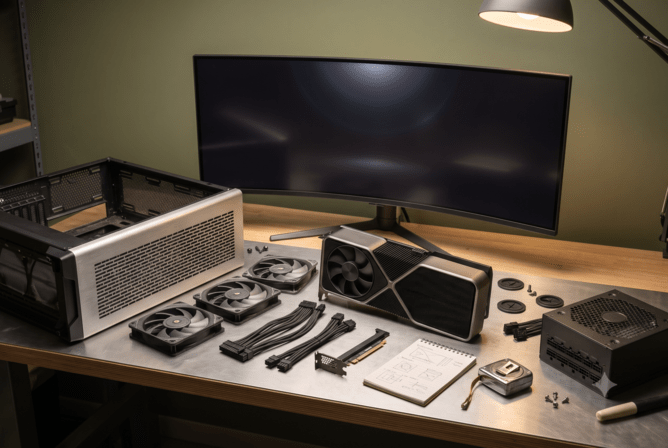
The AW3426DW is more approachable than early ultrawide OLEDs, but it still asks for a capable gaming PC. A 3440×1440 image has more pixels than a standard 1440p. A 280Hz refresh ceiling gives the monitor room to show high frame rates. HDR gaming can raise GPU pressure in some titles. Ray tracing and path tracing can make that pressure much worse.
A player with an older GPU should not assume the monitor will magically improve frame rates. The display can make games look better, but it will also expose system limits. A GPU that was comfortable at 1080p or standard 1440p may need settings cuts at ultrawide resolution.
That does not make the monitor a bad buy. It means the upgrade should be planned. A gamer using an RTX 4070-class, RTX 5070-class, Radeon RX 7800 XT-class, RX 9070-class, or stronger GPU is in a better position to enjoy the display without constant compromise. Lower-tier cards can still work, especially with upscaling and tuned settings, but the buyer should know the target.
This is where the monitor connects back to cooling and case planning. A GPU working harder at ultrawide resolution will produce more heat and noise. A quiet OLED desk setup feels less premium if the tower ramps fans constantly. Case airflow, GPU clearance, power-supply headroom, and cable routing still matter.
Where The AW3426DW Has Tradeoffs
The AW3426DW’s strongest argument is value for a premium ultrawide OLED, not perfection. Reviews have pointed to small drawbacks that buyers should factor into the decision. Windows Central praised the monitor but said it is best for users with a gaming PC that can handle 3440×1440 and take advantage of 280Hz.
Ultrawide support is the first issue. Many PC games support 21:9 beautifully, but some competitive games, older titles, cutscenes, menus, or console-first ports may show black bars, stretched UI, or limited field-of-view behavior. Players who mostly use consoles should be especially cautious because ultrawide is still a PC-first format.
Desk space is the second issue. A 34-inch curved monitor changes viewing distance, speaker placement, arm mount choices, and cable routing. It is not as physically overwhelming as a 45-inch display, but it still needs a clean desk.
Brightness and OLED care are the third issues. The newer panel improves brightness, yet OLED still requires awareness around static desktop elements, taskbars, HUDs, and long work sessions. The buyer should use built-in panel care features, sensible sleep settings, and brightness choices that fit the room.
How It Compares With The Budget OLED Path
The AW3426DW is not competing only with other ultrawides. It is also competing with cheaper 27-inch OLEDs like Alienware’s AW2726DM. The choice between those monitors is a choice between setup styles.
A 27-inch 1440p OLED makes more sense for budget-conscious players, esports-focused gamers, smaller desks, and systems that cannot comfortably drive ultrawide resolution. A 34-inch ultrawide OLED makes more sense for players who want immersion, desktop space, cinematic games, racing, sims, and a monitor that can replace dual-screen clutter.
The AW2726DM shows OLED reaching budget setups. The AW3426DW shows ultrawide OLED becoming a more serious premium upgrade. Those are different lanes, and both matter in 2026.
The smarter buyer does not ask which monitor is “better” in a vacuum. The smarter question is which one matches the GPU, desk, game library, and upgrade plan.
Why Ultrawide OLED Is Becoming A Real Upgrade Category
The Alienware AW3426DW matters because it makes ultrawide OLED feel less like an exotic purchase and more like a serious 2026 upgrade category. The Penta Tandem QD-OLED panel improves brightness and text clarity. The 280Hz refresh rate gives the monitor room for fast games. The 3440×1440 resolution avoids the full burden of 4K. The $799.99 price keeps it expensive, but it is no longer out of reach for many players already considering a premium GPU or full platform upgrade.
For PC gamers, the lesson is clear: the monitor can now be the upgrade that defines the whole system. A stronger GPU matters, but it only matters through the display that shows the frames. A better case matters, but it supports the hardware needed to feed the screen quietly. A desk setup matters because an ultrawide OLED changes the way a gaming space feels every day.
The AW3426DW is not the right monitor for every player. It is too wide for some games, too premium for some budgets, and too demanding for older PCs. Yet it proves that the 34-inch ultrawide OLED has reached a more mature point. It is brighter, faster, sharper for desktop use, and priced aggressively enough to make PC gamers rethink whether the next big upgrade belongs inside the case or directly in front of them.