

Innovative PC builds are no longer just a side hobby for people who like cable combs, RGB zones, and glass panels. They are becoming part of how players present themselves, choose games, build communities, and decide where their money goes. The most useful signal in the research is from Japan: a gaming PC user survey reported that 40% of users chose custom-built BTO systems, while ownership of gaming mice, monitors, keyboards, and other peripherals was also rising among players according to a Japanese gaming PC survey. That does not prove every market is moving the same way, but it does show that the gaming PC is increasingly treated as a personal setup rather than a sealed box under a desk.
That shift matters because setup culture has changed the buying conversation. A player may still care about frame rates, resolution, cooling, and upgrade paths, but those choices now sit next to desk layout, peripheral feel, lighting control, case footprint, noise, and how the machine looks on camera or in a shared photo. PC hardware has always had a practical side. What is different now is that the practical side and the personal side are harder to separate.
What Innovative PC Builds Change At The Desk
The Setup Is Part Of The Player Profile
A gaming PC used to be judged mostly by the tower: CPU, GPU, RAM, storage, and whether the power supply was good enough to support the parts. Those still matter. The difference is that the desk is now part of the build. A keyboard, mouse, monitor, headset, mic arm, chair, lighting, and even cable routing can change the way a player experiences a game. The Newscast survey’s note on increased peripheral ownership fits that shift. Players are not only buying a PC; they are building a station around it.
This is not just decoration. A better mouse can change comfort in shooters. A higher-quality monitor can affect how a player values GPU upgrades. A compact keyboard can free desk space. A quieter case can make late-night gaming less annoying for other people in the room. The cultural layer sits on top of those practical choices: the setup says something about taste, budget, and priorities.
Innovative PC Builds As Personal Identity
The custom PC has become a physical profile page. A small-form-factor build can say the owner values desk space and restraint. A showpiece tower with visible cooling, coordinated fans, and themed colors can say the owner wants the PC to be seen. A budget build with a used GPU and careful airflow can say the owner is focused on value rather than status. None of those choices is automatically better. They just serve different players.
This is why innovative PC builds are changing setup culture more than any single component generation. A new graphics card may create interest for a few months. A desk that feels personal can shape daily gaming for years. That is also why budget advice has to be more honest than “buy the fastest part you can afford.” The best parts list depends on how the player actually uses the space.
Why Custom PCs Are Beating One-Size-Fits-All Thinking
BTO And DIY Sit On The Same Culture Curve
The Japan survey’s 40% BTO figure is useful because it points to a middle ground. Not every player wants to build from bare components, but many still want choice. BTO systems let buyers select a case style, CPU tier, GPU class, memory amount, storage, and cooling setup without taking on every assembly risk. DIY builds go further, giving the owner control over each part and the final layout.
Both routes feed the same cultural change: players want PCs that feel chosen, not assigned. That can mean a clean mid-tower with sensible airflow, a tiny living-room PC, a streaming-focused desk, or a machine built around quiet operation. For readers planning a full setup rather than only a tower, our battle stations under $1,500 guide is a useful companion because it treats the desk, display, and peripherals as part of the same budget problem.
Small Desks Are Pushing Smarter Builds
Not every player has a spare room, a deep desk, or space for a large case. That has made compact PCs and cleaner layouts more appealing. Small-form-factor builds can be harder to plan because case clearance, cooling, power-supply size, and graphics-card dimensions matter more. The payoff is obvious for apartment players, dorm rooms, shared offices, and living-room setups: less space taken, less visual clutter, and a PC that fits the room instead of dominating it.
The caution is that compact does not mean simple. A smaller case can limit cooling choices, make cable management tougher, and narrow future upgrade options. Anyone considering that path should work from exact measurements and manufacturer specifications rather than mood-board photos. Our small-form-factor PC guide is a better starting point than guessing from case images.
The Practical Costs Behind The Culture Shift
Building Still Demands Patience
Setup culture can make PC building look cleaner than it feels. A finished desk photo rarely shows the BIOS update, the front-panel connector confusion, the fan curve testing, or the moment someone realizes a cable is too short. The Guardian described building a gaming PC as painstaking and humbling, while also noting the appeal of doing it again in a PC building experience article. That is a fair warning for new builders: the reward is real, but so is the learning curve.
The smart way to treat a custom setup is as a project, not an impulse buy. Pick the monitor target first, then choose the GPU class, then size the case, power supply, and cooling around that goal. Do not start with lighting, a theme, or a case shape unless you already know the components will fit and run comfortably.
Where The Budget Usually Goes Wrong
Players often overspend on the most visible piece and underspend on the parts that make the system livable. A flashy case with weak airflow is not a good trade. A large GPU in a cramped case can create noise issues. A beautiful desk with a poor monitor can make the whole setup feel worse than the parts list suggests. A cheap power supply is not the place to save money if the system is expected to last through upgrades.
- Prioritize the display target: 1080p, 1440p, ultrawide, and 4K builds need different GPU budgets.
- Protect airflow and power: cases, fans, and power supplies affect noise, heat, and upgrade comfort.
- Buy peripherals by feel: a mouse or keyboard that looks good but feels wrong will age badly.
- Leave room for storage: modern game libraries can fill a small SSD quickly.
- Plan the desk layout: monitor depth, speaker placement, cables, and lighting matter before the PC arrives.
That list is not glamorous, but it is where many good setups are won or lost. The best-looking build is not always the most comfortable one to use at midnight after a long session.
Community Sharing Is Changing What Counts As A Good Build
Photos, Streams, And Social Proof Affect Buying
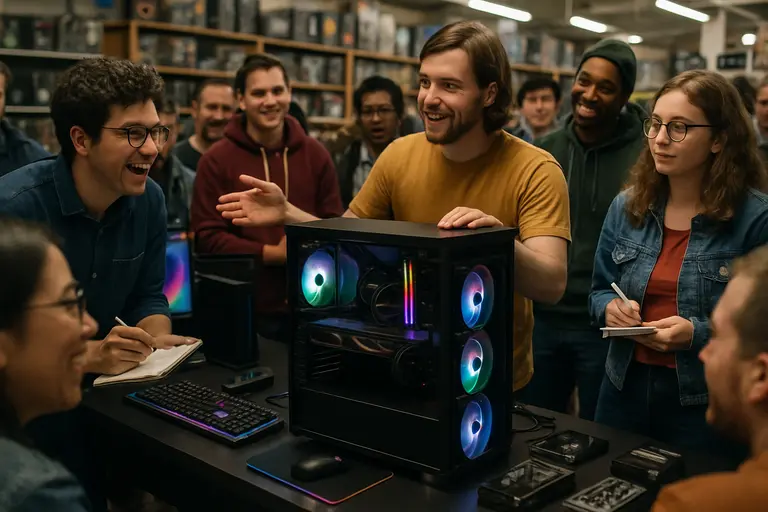
PC setup culture is now heavily visual. Players compare desks, post build photos, ask for cable advice, copy case layouts, and judge whether a rig looks balanced. This creates useful peer pressure when it pushes people toward cleaner airflow, better ergonomics, and smarter desk planning. It can also create bad pressure when players feel they need premium parts just to make a setup look valid.
The healthier read is that a good build serves the owner first. A quiet 1080p system for competitive games can be a better setup than an expensive tower attached to a mismatched monitor. A used-parts build can be more impressive than a luxury system if the builder solved real constraints. For wider gaming-culture coverage from the same network, Mostplays offers insights into how player habits and communities shape what gets attention.
Review-Driven Choices Still Matter
Style should not replace evidence. Case airflow, cooler clearance, monitor response, mouse shape, keyboard switch feel, and headset comfort are all testable in some way. Manufacturer specifications help with fit. Reputable reviews help with real-world usability. Community photos help with ideas, but they should not be treated as proof that a part is right for every build.
This is where the modern setup builder needs a split mindset. Be creative with the theme, layout, and personal choices. Be strict with dimensions, thermals, power needs, and warranty terms. A creative PC can still be badly planned. A plain PC can be excellent. The goal is to avoid paying for style that hurts the gaming experience.
Why Innovative PC Builds Matter To Gaming Culture
Innovative PC builds matter because they change the gaming PC from a performance appliance into a visible part of player culture. The strongest supported data here is not a universal global claim; it is the survey evidence from Japan showing a strong BTO preference among gaming PC users and rising peripheral ownership. Combined with the lived challenge of building a PC, it points to a clear pattern: players want more control, but that control takes planning.
For budget buyers, that means the best setup is not the most expensive one. It is the one that matches the games, the room, the display, and the upgrade plan. For hobbyists, it means personal expression should still respect airflow, fit, noise, and reliability. For the wider community, it means the gaming desk has become part of the medium. The PC is not only where games run. It is where players show how they play, what they value, and how much of themselves they want built into the machine.