

A better gaming setup in late 2026 starts with accepting the part nobody wanted: graphics cards did not reset to easy-buy pricing after the latest repricing wave. The clearest supported data point in the supplied research comes from Tom’s Hardware, which reported on August 10, 2026 that GeForce RTX 50-series pricing had climbed sharply in U.S. Newegg listings, with the RTX 5070 up 36%, the RTX 5060 up 27%, and the RTX 5060 Ti 16GB up 39% versus June medians Tom’s Hardware reported. That does not mean every card, every store, or every region moved by the same amount. It does mean the old shortcut of picking a GPU first and cleaning up the rest of the build later is riskier than it was during calmer pricing cycles.
For setup buyers, the smarter move is not panic buying. It is putting hard limits around the display target, the GPU tier, and the parts that should last through more than one graphics-card cycle. If you want broader game and PC culture coverage alongside hardware planning, Hexiled Gaming, a related site in the same network, is worth keeping nearby.
Why GPU Pricing Changed The Setup Budget
What The RTX 50 Numbers Say
The RTX 50-series increases matter because they hit the cards many buyers would naturally consider for new 1080p, 1440p, and entry-level high-refresh builds. A 27% to 39% movement on median listings can push a planned build into a higher total budget, or force a buyer to downgrade another part to keep the same GPU. That is where a setup starts to get weaker. A cheaper power supply, cramped case, undersized SSD, or bargain monitor can make the machine feel worse than the GPU spec sheet suggests.
The other issue is timing. Price movement shown in August 2026 was already in the past as of October 22, 2026, but it still shapes buying behavior now. Shoppers who delayed a purchase hoping for a clean drop may be looking at stubborn retail tags. Shoppers who already bought may feel lucky, but that does not prove the same choice is right for everyone. Hardware prices can shift by model, board partner, retailer, and inventory age, so buyers should compare live listings before treating any reported percentage as a personal quote.
Why The GPU Cannot Be The Whole Plan
A graphics card is still the main performance spend for most gaming PCs, but high GPU pricing makes balance more important. If the GPU eats too much of the budget, the rest of the setup can become a string of compromises. That can mean a monitor that cannot show the frame rates the card is built for, RAM capacity that feels tight during gaming and streaming, or storage that fills after a few large installs. Our related piece on rising GPU prices covers the wider build-pressure problem from the same buyer-first angle.
Build The Gaming Setup Around The Display
Gaming Setup Choices By Resolution
Your gaming setup should start with the screen because the monitor is the part that turns GPU spend into something you can actually see. A 1080p monitor with a modest refresh ceiling does not justify the same graphics-card budget as a 1440p high-refresh display or a 4K screen. That does not make lower-resolution setups bad. It makes them cheaper to support if the buyer stays disciplined.
For 1080p, the practical question is whether the card fits the refresh rate and games you actually play. Competitive players often care more about stable frame pacing and input feel than ultra settings. For 1440p, the GPU and VRAM decision becomes more sensitive because newer games, higher texture settings, and high-refresh panels put more strain on the card. For 4K, the budget pressure is harsher because the GPU tier usually rises, and the monitor often costs more too.
The trap is buying a graphics card for a future monitor that never arrives. If the display upgrade is not happening within the same buying window, it may be smarter to choose a GPU for the screen on your desk, then save for a monitor refresh later. The reverse can also work: buy the monitor first if your current GPU is still acceptable, then upgrade the card when pricing or availability looks better.
- 1080p buyers: protect the budget and avoid paying for unused high-end GPU headroom.
- 1440p buyers: compare VRAM, cooler quality, and real retail price before jumping tiers.
- 4K buyers: expect less flexibility and avoid cutting PSU, case, or cooling quality to fund the GPU.
Choose New, Used, Prebuilt, Or Laptop Hardware
Prebuilt And Laptop Trade-Offs
When individual graphics cards are expensive, a prebuilt desktop or gaming laptop can deserve a fresh look. That does not mean either option is automatically cheaper. It means the total package may sometimes compare well against buying a GPU, CPU, motherboard, memory, storage, power supply, case, cooling, Windows license, and assembly time one by one. TechRadar maintains a reviewed 2026 gaming laptop list, which is a useful cross-check for buyers comparing portable systems against desktop parts lists TechRadar’s laptop picks.
A prebuilt desktop can make sense if the GPU price inside the system is effectively lower than the same card at retail. The buyer still needs to inspect the less glamorous parts: power supply rating, motherboard class, case airflow, RAM configuration, SSD size, warranty terms, and whether proprietary parts limit future upgrades. A gaming laptop can make sense for dorms, travel, or small spaces, but it trades desktop upgrade flexibility for portability. Laptop GPUs also are not identical to desktop cards just because the names look similar, so model-by-model reviews matter.
Used GPU Risk Is Higher When New Cards Rise
The used market often looks like the relief valve during new-card inflation, but it can tighten when enough buyers start chasing the same older models. The research supplied for this piece points to used-card prices moving upward too, though the strongest allowed source set here does not let us cite those trackers directly. Treat that as a reason to inspect carefully rather than a reason to avoid used hardware completely.
If you buy used, ask for proof that the card works under load, check whether any warranty remains, inspect photos for corrosion or physical damage, and be wary of vague listings. A small discount is not worth much if the card runs hot, has failing fans, or arrives with no return path. Used GPUs can still be sensible, but in a high-price cycle the gap between a fair deal and a risky shortcut gets narrow.
Protect The Parts That Outlive The GPU
PSU Cooling And Case Planning
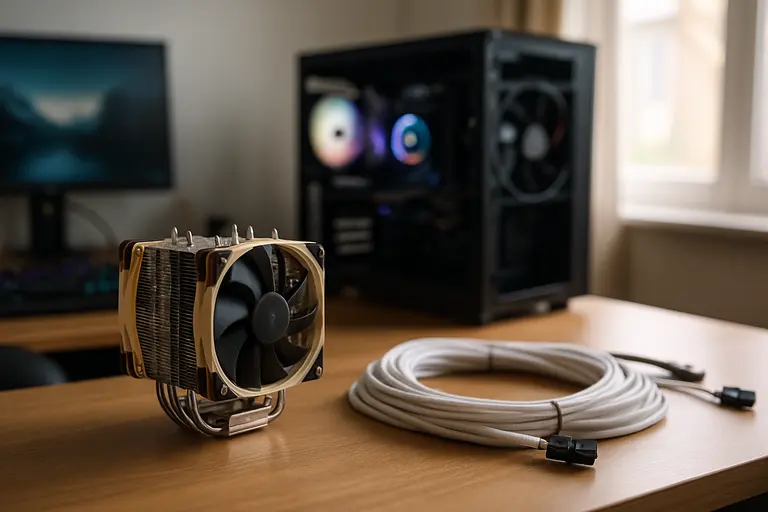
One of the best setup moves is spending properly on the parts that may survive the next GPU swap. A quality power supply, roomy airflow-focused case, and sensible CPU cooler can carry through several graphics-card upgrades. Skimping on those parts to stretch into a higher GPU tier can backfire when the next card needs more clearance, more power headroom, or better airflow.
Do not treat wattage as the only power-supply spec that matters. Connector support, build quality, warranty, efficiency rating, and transient-load behavior all matter, especially with modern GPUs. The safest buyer habit is simple: check the GPU vendor’s published power guidance, then pair it with a reputable PSU that leaves reasonable room for the rest of the system. Avoid assuming that a bargain unit with a big number on the label is equal to a well-reviewed model.
RAM And Storage Should Be Boring In A Good Way
RAM and storage are not where most gamers want to spend emotional energy, but they shape daily feel. A practical 2026 build should avoid the minimum-capacity trap. For many gaming PCs, 32GB of RAM is a comfortable target if the user also streams, keeps voice chat open, records clips, or runs browser tabs on a second screen. A 1TB NVMe SSD is a reasonable floor for a main drive, though players with large libraries may want more if pricing allows.
That does not mean overbuying is smart. Paying heavily for extreme RAM capacity or excess storage can drain money from the GPU, monitor, chair, audio, or controller setup. The goal is to remove obvious friction without turning every support part into a luxury purchase.
A Smarter Gaming Setup After GPU Price Spikes
The best gaming setup after the 2026 GPU repricing wave is not the most expensive parts list. It is the one where the monitor, graphics card, CPU, memory, storage, power supply, cooling, and case all make sense together. Start with the display target, set a hard GPU ceiling, compare new cards against prebuilts and laptops, and be careful with used listings that no longer look cheap enough to offset risk.
Prices and availability can change quickly, so no buyer should treat a single August 2026 report as a permanent rule. Still, the signal is useful: GPU costs have been high enough to change setup planning. Build around what you can see, protect the parts that last, and leave yourself an upgrade path that does not require rebuilding the whole PC the next time graphics-card pricing moves.